
ToolShell: When Patching Isn't the Whole Fix
Over the weekend of July 19, Microsoft confirmed active exploitation of a critical remote code execution vulnerability in on-premises SharePoint Server, tracked as CVE-2025-53770 and widely called “ToolShell”. The flaw was a variant of issues Microsoft had patched earlier in the month, which attackers had found a way around. Exploitation was first reported on July 18, and in the days that followed security firms identified compromised servers across government, education, energy and private industry. Microsoft later attributed activity to two China-based espionage groups and a third actor, Storm-2603, which deployed Warlock ransomware in some intrusions.
SharePoint Online in Microsoft 365 wasn’t affected. On-premises SharePoint farms, which many organizations still run for document management and line-of-business applications, were.
Timeline
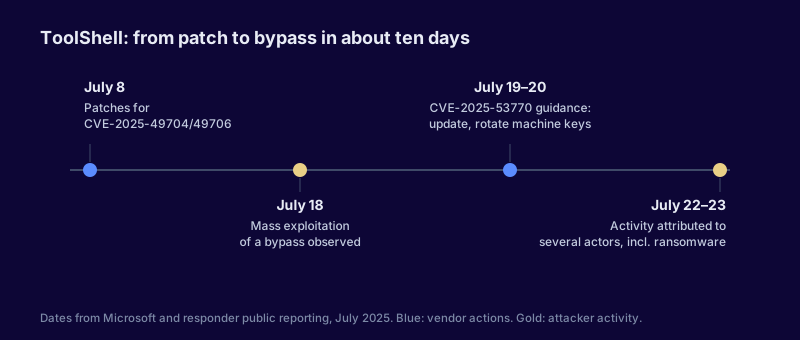
Figure 1. The ToolShell timeline, from Microsoft’s and responders’ public reporting. Attackers used the original patches as a starting point for a bypass within about ten days.
What made this campaign different
Many web server exploitation campaigns end with a web shell. ToolShell intrusions commonly went a step further. Responders observed attackers dropping a small ASPX file whose purpose was to read the server’s ASP.NET machine keys, the ValidationKey and DecryptionKey that SharePoint uses to sign and encrypt view state.
With those keys, an attacker can create forged view state payloads that the server accepts as legitimate, and get code execution again, without needing the original vulnerability. Patching the server closes the original door. If the keys aren’t rotated, a stolen copy is still a working key to the building.
That’s why Microsoft’s guidance had two parts: apply the update, and rotate the machine keys, then restart IIS. Organizations that did only the first part may have left attackers with continued access.
How response should change when keys are stolen
This pattern isn’t unique to SharePoint. Any compromise that exposes signing keys, session secrets, tokens or service account credentials creates persistence that survives patching. The response checklist needs to treat secret rotation as part of the fix.
For any internet-facing application compromise, ask:
- What secrets did the compromised process have access to? Machine keys, API tokens, database connection strings, service account credentials, certificates.
- Which of those can be used from outside the server to regain access or impersonate it?
- Have all of them been rotated, and have dependent systems been updated to use the new values?
What to check on on-premises SharePoint
If you run SharePoint Server, these checks apply even if you patched quickly:
- Confirm the update level. Make sure every server in the farm has the emergency updates for CVE-2025-53770 and the related CVE-2025-53771. SharePoint 2010 and 2013 are out of support and didn’t receive fixes.
- Rotate machine keys and restart IIS on all servers in the farm, in line with Microsoft’s guidance.
- Look for unexpected ASPX files in the SharePoint layouts directories, particularly files created around and after July 17. Public reporting named one commonly dropped file, but attackers varied names quickly, so look for anything you can’t account for.
- Review IIS logs for POST requests to the ToolPane endpoint with suspicious referrers, and for requests to newly created files.
- Check that AMSI integration is enabled for SharePoint, with an endpoint protection product that inspects requests. Microsoft recommended it as a mitigation.
- Review what the SharePoint service accounts can reach. Ransomware deployment in some intrusions followed lateral movement from the SharePoint server. If those accounts have broad privileges, reduce them.
- Decide whether the farm needs to be internet-facing at all. Many on-premises farms are published for remote access that could be provided through a gateway with stronger authentication.
The broader pattern: patches as a roadmap
The original patches released on July 8 addressed two vulnerabilities. Within about ten days, attackers had studied the fix and found a bypass. That cycle, from patch to diff to variant, has become faster across many products, and it means a patched system isn’t necessarily a closed one.
For organizations, the practical implications are:
- After a critical patch for an internet-facing system, increase monitoring on that system for several weeks after the patch is applied.
- Treat vendor statements that a fix is “comprehensive” as provisional until the vendor has had time to observe exploitation attempts.
- Keep exposure low in the first place. A service that isn’t reachable from the internet gives attackers far less time to study and exploit it.
Where this leaves on-premises collaboration
ToolShell will accelerate conversations about moving remaining on-premises SharePoint workloads to cloud-hosted services, and for some organizations that’s the right answer. For others, regulatory, contractual or application-specific constraints will keep farms on-premises for years. Those farms can be run well: patched promptly, kept off the internet where possible, monitored closely, and with secrets that are rotated whenever there’s reason to believe they’ve been exposed.