
Designing Enterprise Assistants After EchoLeak
In June, researchers disclosed EchoLeak (CVE-2025-32711), a vulnerability in Microsoft 365 Copilot that Microsoft had already fixed on the service side. Its significance goes well beyond one product. The researchers showed that an attacker could send an ordinary-looking email to someone in a target organization and, without the recipient ever opening it, cause the assistant to include sensitive internal data in a response and send that data to an attacker-controlled location.
No credentials were stolen. No malware ran. The assistant did what it was built to do: retrieve relevant context and act on the text it found there. The attacker’s text was part of that context.
This paper explains why that class of problem is structural for retrieval-augmented assistants, and what organizations deploying them can do.
How the attack worked
The published research describes a chain with four links:
- Delivery. The attacker sends an email containing instructions written to read as normal guidance to a human, which helped them avoid the classifiers designed to detect prompt injection.
- Retrieval. Later, when the user asks the assistant an unrelated question, the assistant’s retrieval step pulls in that email as relevant context, alongside the user’s genuine internal data.
- Instruction following. The model treats the attacker’s text as instructions and includes sensitive information from the user’s context in its answer, formatted as a link or image reference.
- Exfiltration. The client renders that reference and makes a request to a URL that carries the data. The researchers found ways to route this through domains the client trusted.
The researchers called the core weakness an “LLM scope violation”: untrusted input causes the model to reach into data it can access only because of the user’s privileges.
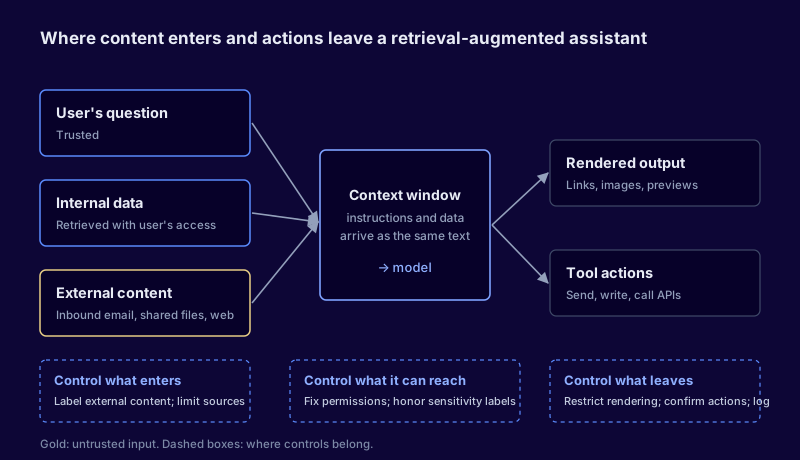
Figure 1. In a retrieval-augmented assistant, trusted and untrusted content meet in the same context window. Controls need to sit at the boundaries where content enters and where actions leave.
Why this is structural
Traditional applications separate code from data. Security engineering spent decades learning to enforce that boundary, through parameterized queries, output encoding and content security policies.
Language models don’t have an equivalent boundary. Instructions and data arrive as the same thing: text in a context window. Any content the assistant retrieves, including email from outside the organization, shared documents, web pages and ticket comments, can carry instructions. Model providers are improving resistance, and classifiers catch many attempts. Neither offers a guarantee, and the EchoLeak research showed how carefully worded injections can get past both.
The practical conclusion is to design assistants on the assumption that injection will sometimes succeed, and to limit what a successful injection can do.
A control model for retrieval-augmented assistants
The controls below are organized around three questions: what can enter the context, what the assistant can reach, and what can leave.
What enters the context
Label content by trust level. Distinguish internal content created by employees from external content: inbound email, files shared from outside, web results. Where the platform allows it, exclude external content from retrieval for sensitive queries, or present it to the model with clear marking.
Be deliberate about connected sources. Each data source connected to an assistant expands both its usefulness and its attack surface. Connect a source when a use case needs it.
What the assistant can reach
Fix permissions before deployment. An assistant retrieves with the user’s permissions. In most organizations, users can technically reach far more than they realize: overshared sites, legacy file shares, broadly scoped groups. The assistant makes that oversharing searchable. A permissions review of the major content stores is the single most valuable preparation for an enterprise assistant rollout.
Apply sensitivity labels and honor them. Where data classification exists, confirm the assistant respects it, and consider excluding the most sensitive categories from assistant retrieval entirely.
What can leave
Control rendering. Many exfiltration techniques rely on the client automatically fetching an image or following a link. Restrict which domains assistant output can reference, and treat automatic rendering of external resources as a risk to be justified.
Gate actions. As assistants gain the ability to send messages, create files or call tools, every action that sends data outside the user’s session is a potential exfiltration path. Require user confirmation for those actions and show the user exactly what will be sent.
Log prompts, retrievals and actions. When something goes wrong, investigators need to see which content was retrieved and what the assistant did. Confirm that logging is available, retained and reaching your security team.
Questions to ask your assistant provider
| Question | Why it matters |
|---|---|
| How is external content distinguished from internal content during retrieval? | Determines whether untrusted input can be isolated |
| What prevents output from causing requests to arbitrary domains? | Closes the most common exfiltration channel |
| Which actions can the assistant take without user confirmation? | Defines what a successful injection can do |
| What prompt, retrieval and action logs are available to customers? | Determines whether you can investigate |
| How are injection-related vulnerabilities reported and fixed? | Shows how quickly service-side fixes reach you |
Sequencing the work
Organizations that have already deployed an assistant don’t need to pause it. A reasonable order is:
- Review permissions on the content stores the assistant can search, starting with the most widely shared.
- Review connected sources and disconnect those without a clear use case.
- Confirm rendering and action controls are configured restrictively.
- Turn on logging and give the security operations team a way to search it.
- Add assistant scenarios to threat modeling for any new connector or capability.
Each step reduces what an injection can reach or send, whether or not the model resists it.
Looking ahead
EchoLeak was disclosed responsibly and fixed before public release. The next one may not be. The broader lesson is that every new data source and every new capability added to an assistant should be reviewed the way a new integration would be: who can put content into it, what it can reach, and what it can send out. Organizations that build that habit now will be in a much better position as assistants become agents that act on their own.